Masking of Sensitive LLM Data
Masking is a feature that allows precise control over the tracing data sent to the Langfuse server. With custom masking functions, you can control and sanitize the data that gets traced and sent to the server. Whether it's for compliance reasons or to protect user privacy, masking sensitive data is a crucial step in responsible application development. It enables you to:
- Redact sensitive information from trace or observation inputs, outputs, and metadata.
- Customize the content of events before transmission.
- Implement fine-grained data filtering based on your specific requirements.
Learn more about Langfuse's data security and privacy measures concerning the stored data in our security and compliance overview.
How it works
Langfuse supports two client-side masking hooks. Choose the hook based on where the data is created.
| Hook | SDK | Use for | Important behavior |
|---|---|---|---|
mask | Python, JS/TS | Data written through Langfuse SDK APIs, such as observation input, output, and metadata | Runs when Langfuse SDK data is recorded. It is the simplest option for data you pass directly to Langfuse. |
mask_otel_spans | Python | Final OpenTelemetry span attributes before this Langfuse client exports them to Langfuse | Runs after span filtering and media handling. It is the right option for third-party OTEL instrumentation and final exported span attributes. |
should_export_span / shouldExportSpan | Python, JS/TS | Dropping or keeping whole spans | Use this for span-level filtering. Do not use masking callbacks to drop spans. |
mask_otel_spans only changes the copy of the OpenTelemetry spans exported by
the Langfuse Python SDK. It does not mutate the original OpenTelemetry span. If
the same span is also exported to a third-party observability backend, such as
Datadog, Honeycomb, Grafana Tempo, or an OpenTelemetry Collector, that exporter
receives its own unmodified span copy.
Use mask when you control the data written through Langfuse SDK methods. Use
mask_otel_spans when sensitive data is emitted by third-party OpenTelemetry
instrumentation or when you need to inspect the final OTEL attributes that will
be sent to Langfuse.
Define a masking function. The mask function applies to event inputs, outputs,
and metadata written through Langfuse SDK APIs.
def masking_function(data: any, **kwargs) -> any:
    """Function to mask sensitive data before sending to Langfuse."""
    if isinstance(data, str) and data.startswith("SECRET_"):
        return "REDACTED"

    # For more complex data structures
    elif isinstance(data, dict):
        return {k: masking_function(v) for k, v in data.items()}
    elif isinstance(data, list):
        return [masking_function(item) for item in data]

    return data
Apply the masking function when initializing the Langfuse client:
from langfuse import Langfuse

# Initialize with masking function
langfuse = Langfuse(mask=masking_function)

# Then get the client
from langfuse import get_client
langfuse = get_client()
With the decorator:
from langfuse import observe

langfuse = Langfuse(mask=masking_function)


@observe()
def my_function():
    # This data will be masked before being sent to Langfuse
    return "SECRET_DATA"

result = my_function()
print(result)  # Original: "SECRET_DATA"

# The trace output in Langfuse will have the output masked as "REDACTED"
Using context managers:
from langfuse import Langfuse

langfuse = Langfuse(mask=masking_function)

with langfuse.start_as_current_observation(
    as_type="span",
    name="sensitive-operation",
    input="SECRET_INPUT_DATA"
) as span:
    # ... processing ...
    span.update(output="SECRET_OUTPUT_DATA")

# Both input and output will be masked as "REDACTED" in Langfuse
To prevent sensitive data from being sent to Langfuse, you can provide a mask function to the LangfuseSpanProcessor. This function will be applied to the input, output, and metadata of every observation.
The function receives an object { data }, where data is the stringified JSON of the attribute's value. It should return the masked data.
import { NodeSDK } from "@opentelemetry/sdk-node";
import { LangfuseSpanProcessor } from "@langfuse/otel";

const spanProcessor = new LangfuseSpanProcessor({
  mask: ({ data }) => {
    // A simple regex to mask credit card numbers
    const maskedData = data.replace(
      /\b\d{4}[- ]?\d{4}[- ]?\d{4}[- ]?\d{4}\b/g,
      "***MASKED_CREDIT_CARD***",
    );
    return maskedData;
  },
});

const sdk = new NodeSDK({
  spanProcessors: [spanProcessor],
});

sdk.start();
See JS/TS SDK docs for more details.
When using the CallbackHandler, you can pass mask to the constructor:
import { CallbackHandler } from "langfuse-langchain";

function maskingFunction(params: { data: any }) {
  if (typeof params.data === "string" && params.data.startsWith("SECRET_")) {
    return "REDACTED";
  }

  return params.data;
}

const handler = new CallbackHandler({
  mask: maskingFunction,
});
Mask OpenTelemetry span attributes in Python
Use mask_otel_spans when you need to redact OpenTelemetry spans before the
Langfuse Python SDK sends them to Langfuse. This is especially useful for spans
created by third-party instrumentations such as OpenInference, OpenLLMetry,
OpenLIT, LiteLLM, or provider-specific OTEL libraries.
The callback receives one OpenTelemetry export batch. A batch is not guaranteed
to contain a complete trace or request. Return None to leave the batch
unchanged, or return sparse patches for the spans you want to change.
from typing import Optional

from langfuse import Langfuse
from langfuse.types import (
    MaskOtelSpansParams,
    MaskOtelSpansResult,
    OtelSpanPatch,
)

SENSITIVE_ATTRIBUTE_PREFIXES = (
    "gen_ai.prompt.",
    "gen_ai.completion.",
    "llm.input_messages.",
    "llm.output_messages.",
)
SENSITIVE_ATTRIBUTE_KEYS = {
    "gen_ai.prompt",
    "gen_ai.completion",
}


def mask_otel_spans(
    *, params: MaskOtelSpansParams
) -> Optional[MaskOtelSpansResult]:
    patches = {}

    for identifier, span in params.spans.items():
        sensitive_keys = tuple(
            key
            for key in span.attributes
            if key in SENSITIVE_ATTRIBUTE_KEYS
            or key.startswith(SENSITIVE_ATTRIBUTE_PREFIXES)
        )

        if not sensitive_keys:
            continue

        patches[identifier] = OtelSpanPatch(
            delete_attributes=sensitive_keys,
            set_attributes={"masking.applied": True},
        )

    return MaskOtelSpansResult(span_patches=patches)


langfuse = Langfuse(mask_otel_spans=mask_otel_spans)
mask_otel_spans runs after should_export_span accepts a span and after
export-stage media handling converts supported media payloads into Langfuse
media references. The callback can:
- Read span IDs, parent span ID, name, instrumentation scope, attributes, and resource attributes.
- Delete exact attribute keys.
- Set or replace OpenTelemetry-compatible attribute values.
The callback cannot change span IDs, span names, parent relationships, resource attributes, events, links, or instrumentation scope.
Failure Behavior
If mask_otel_spans raises an exception or returns an invalid batch result,
Langfuse drops the whole export batch. If one returned span patch is invalid,
Langfuse drops only that span from the Langfuse export. Keep the function
deterministic and add explicit fallback behavior.
Using external PII services
If you use an IO-bound PII detection or redaction service, mask_otel_spans is
usually the right place to call it for third-party OTEL span data. Normal batch
exports run outside the main application path, so this avoids blocking the code
that creates or ends spans.
Keep the callback synchronous, bounded, and batch-oriented:
- Batch candidate attributes from
params.spansand call the PII service once per export batch where possible. - Use strict network timeouts.
- Decide whether failures should drop the batch, delete sensitive attributes, or export the original values.
- Avoid request-local state, the current active span, and async-only APIs. During
flush()or shutdown, the callback may run on the caller thread.
Examples
Now, we'll show you examples how to use the masking feature. We'll use the Langfuse decorator for this, but you can also use the low-level SDK or the JS/TS SDK analogously.
Example 1: Redacting Credit Card Numbers
In this example, we'll demonstrate how to redact credit card numbers from strings using a regular expression. This helps in complying with PCI DSS by ensuring that credit card numbers are not transmitted or stored improperly.
Langfuse's masking feature allows you to define a custom masking function with parameters, which you then pass to the Langfuse client constructor. This function is applied to all event inputs, outputs, and metadata, processing each piece of data to mask or redact sensitive information according to your specifications. By ensuring that all events are processed through your masking function before being sent, Langfuse guarantees that only the masked data is transmitted to the Langfuse server.
Steps:
- Import necessary modules.
- Define a masking function that uses a regular expression to detect and replace credit card numbers.
- Configure the masking function in Langfuse.
- Create a sample function to simulate processing sensitive data.
- Observe the trace to see the masked output.
import re
from langfuse import Langfuse, observe, get_client

# Step 2: Define the masking function
def masking_function(data, **kwargs):
    if isinstance(data, str):
        # Regular expression to match credit card numbers (Visa, MasterCard, AmEx, etc.)
        pattern = r'\b(?:\d[ -]*?){13,19}\b'
        data = re.sub(pattern, '[REDACTED CREDIT CARD]', data)
    return data

# Step 3: Configure the masking function
langfuse = Langfuse(mask=masking_function)

# Step 4: Create a sample function with sensitive data
@observe()
def process_payment():
    # Simulated sensitive data containing a credit card number
    transaction_info = "Customer paid with card number 4111 1111 1111 1111."
    return transaction_info

# Step 5: Observe the trace
result = process_payment()

print(result)
# Output: Customer paid with card number [REDACTED CREDIT CARD].

# Flush events in short-lived applications
langfuse.flush()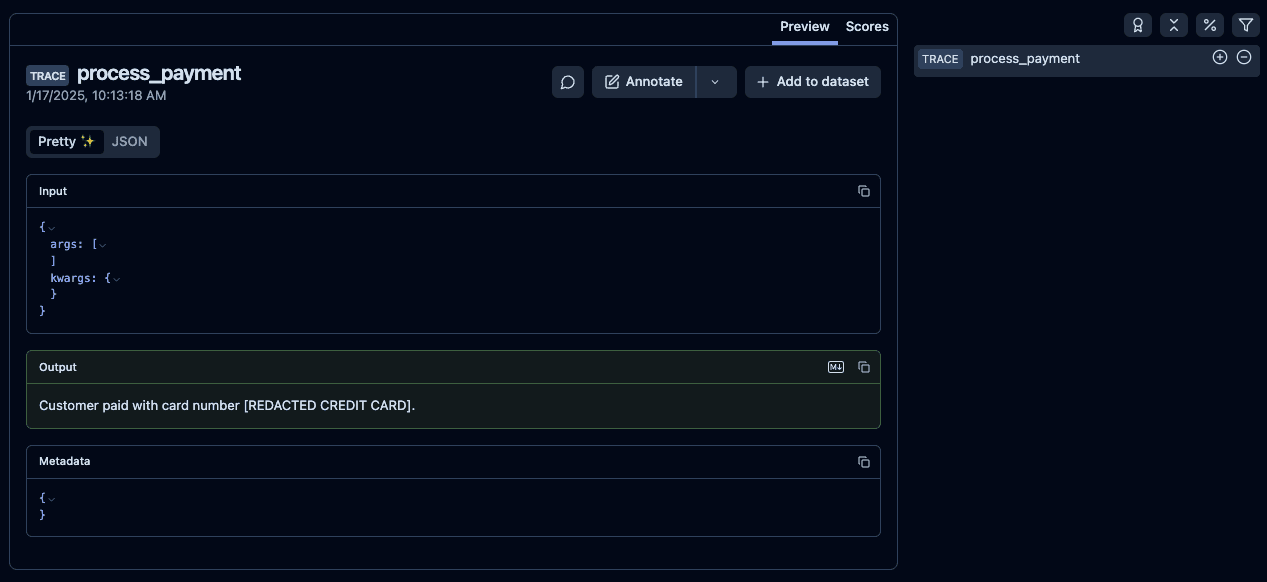
Example 2: Using the llm-guard library
In this example, we'll use the Anonymize scanner from llm-guard to remove personal names and other PII from the data. This is useful for anonymizing user data and protecting privacy.
Find our more about the llm-guard library in their documentation.
Steps:
- Install the
llm-guardlibrary. - Import necessary modules.
- Initialize the Vault and configure the Anonymize scanner.
- Define a masking function that uses the Anonymize scanner.
- Configure the masking function in Langfuse.
- Create a sample function to simulate processing data with PII.
- Observe the trace to see the masked output.
pip install llm-guardfrom langfuse import Langfuse, observe, get_client
from llm_guard.vault import Vault
from llm_guard.input_scanners import Anonymize
from llm_guard.input_scanners.anonymize_helpers import BERT_LARGE_NER_CONF
# Step 3: Initialize the Vault and configure the Anonymize scanner
vault = Vault()
def create_anonymize_scanner():
scanner = Anonymize(
vault,
recognizer_conf=BERT_LARGE_NER_CONF,
language="en"
)
return scanner
# Step 4: Define the masking function
def masking_function(data, **kwargs):
if isinstance(data, str):
scanner = create_anonymize_scanner()
# Scan and redact the data
sanitized_data, is_valid, risk_score = scanner.scan(data)
return sanitized_data
return data
# Step 5: Configure the masking function
langfuse = Langfuse(mask=masking_function)
# Step 6: Create a sample function with PII
@observe()
def generate_report():
# Simulated data containing personal names
report = "John Doe met with Jane Smith to discuss the project."
return report
# Step 7: Observe the trace
result = generate_report()
print(result)
# Output: [REDACTED_PERSON] met with [REDACTED_PERSON] to discuss the project.
# Flush events in short-lived applications
langfuse.flush()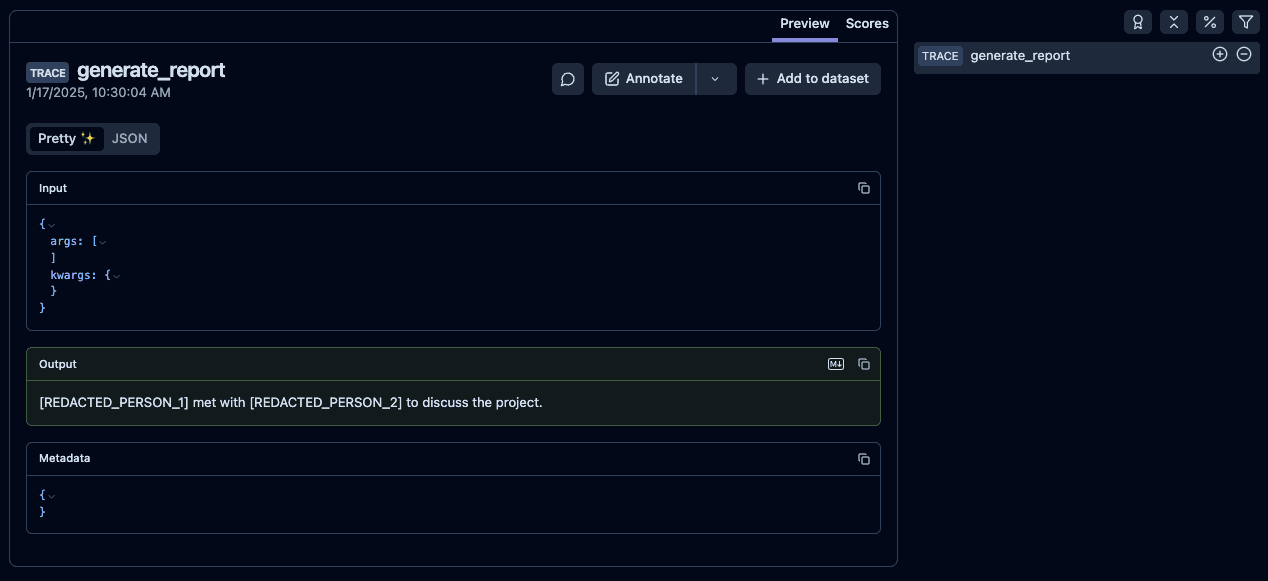
Link to the trace in Langfuse 2
Example 3: Masking Email and Phone Numbers
You can extend the masking function to redact other types of PII such as email addresses and phone numbers using regular expressions.
import re
from langfuse import Langfuse, observe, get_client

def masking_function(data, **kwargs):
    if isinstance(data, str):
        # Mask email addresses
        data = re.sub(r'\b[\w.-]+?@\w+?\.\w+?\b', '[REDACTED EMAIL]', data)
        # Mask phone numbers
        data = re.sub(r'\b\d{3}[-. ]?\d{3}[-. ]?\d{4}\b', '[REDACTED PHONE]', data)
    return data

langfuse = Langfuse(mask=masking_function)

@observe()
def contact_customer():
    info = "Please contact John at john.doe@example.com or call 555-123-4567."
    return info

result = contact_customer()

print(result)
# Output: Please contact John at [REDACTED EMAIL] or call [REDACTED PHONE].

# Flush events in short-lived applications
langfuse.flush()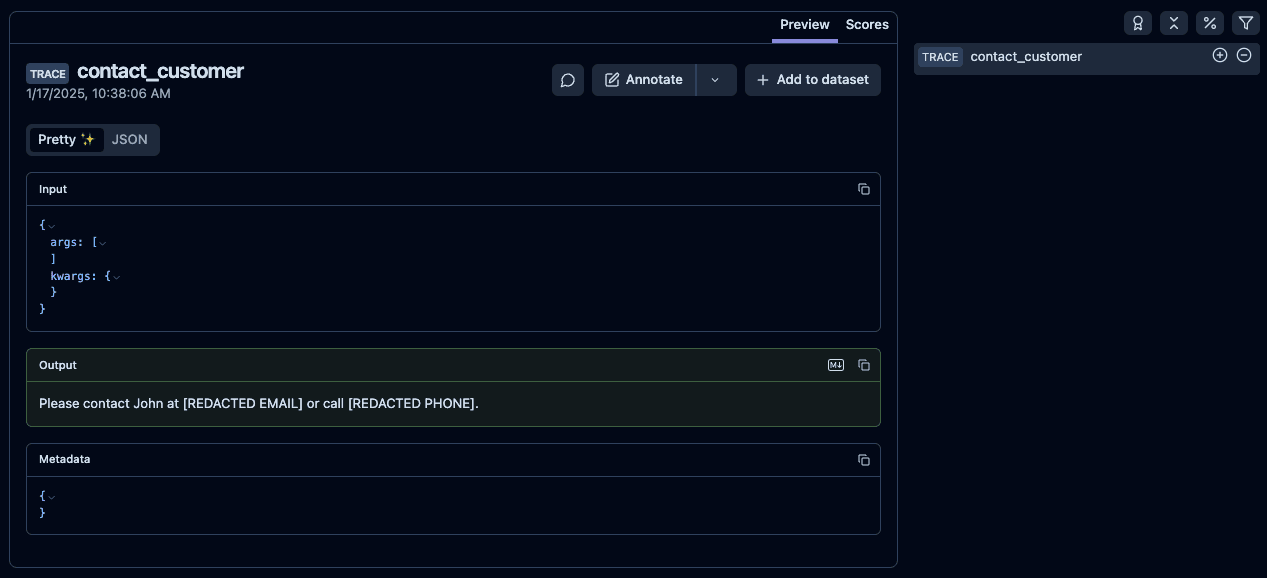
Related Resources
- Data Retention — Automatically delete traces, observations, scores, and media assets after a configured retention period.
- Data Deletion — Manually delete individual or batches of traces.


